> ## Documentation Index
> Fetch the complete documentation index at: https://help-onechatai.telavi.com.ph/llms.txt
> Use this file to discover all available pages before exploring further.

# Instagram Chatbot

> This guide will walk you through the steps to create your Instagram chatbot.

### **Why Instagram Chatbot?**

Creating an Instagram chatbot offers several benefits that can significantly enhance your online presence and business operations:

* **24/7 Customer Support:** You can respond instantly to customer inquiries at any time of the day.
* **Increased Engagement**: Chatbots can engage with your audience in real time, sending personalized messages, updates, and promotions.
* **Lead Generation**: By interacting with visitors and taking essential information, chatbots can help generate leads, making it easier to convert potential customers into actual customers.
* **Scalability**: Unlike human agents, chatbots can handle multiple conversations simultaneously.

To create your Instagram chatbot and manage all your chatbots, you first need to visit the  TelaviOneChatAI Dashboard

### **How to Create Your Instagram Chatbot?**

Follow these quick steps to create your Instagram chatbot:-

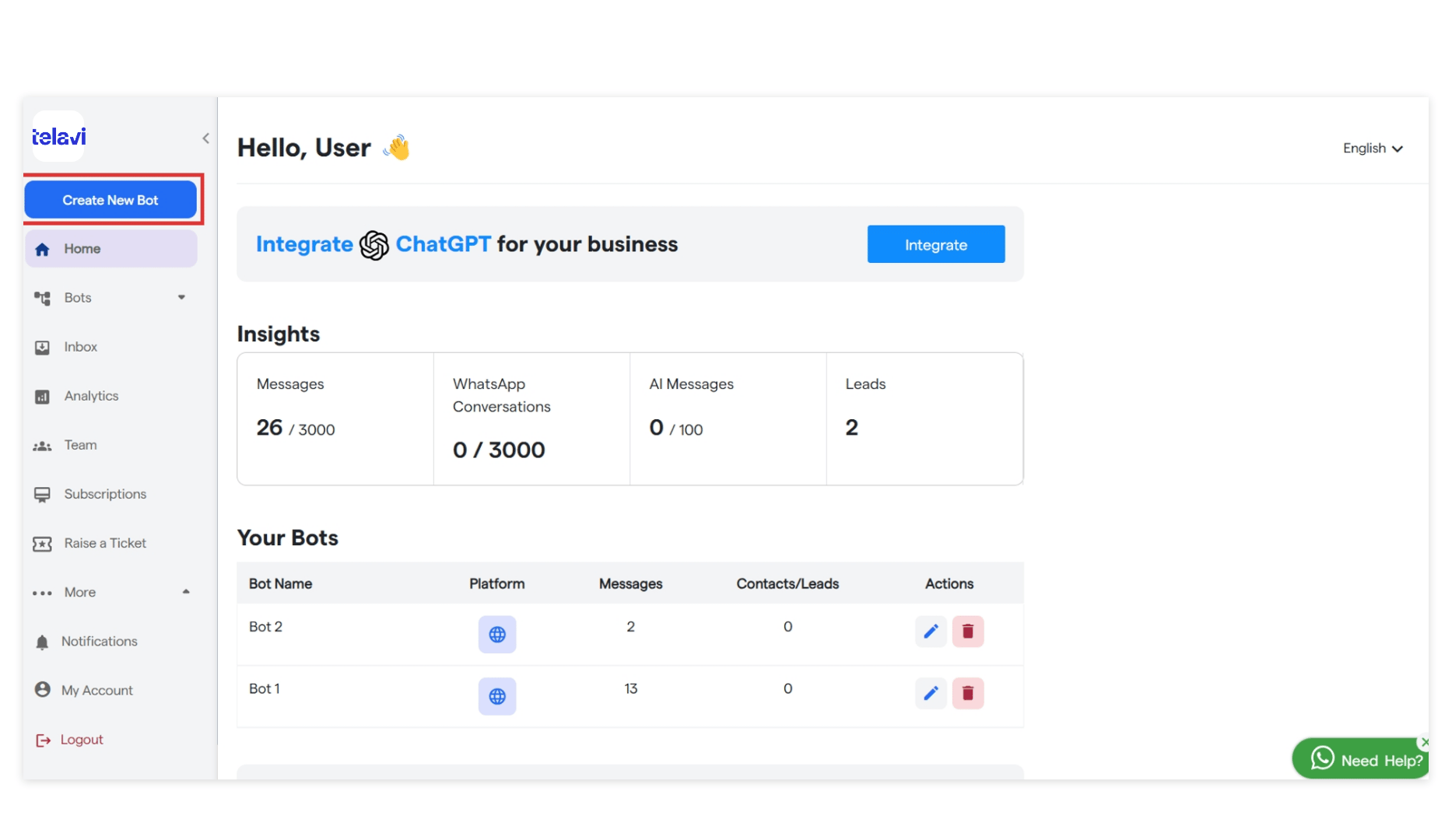
1. To start creating your new chatbot, click **"Create New Bot."**
<img src="https://mintcdn.com/telavi/coZiJ9Ha2gGa5SDj/images/how-TelaviOneChatAI-works/create-newchatbot/8.instagram_chatbot__TelaviOneChatAI_resource_centre-1.png?fit=max&auto=format&n=coZiJ9Ha2gGa5SDj&q=85&s=194bf49154d92996581c90e642cfd7bb" alt="8 Instagram Chatbot  TelaviOneChatAI Resource Centre 1 Pn" width="1866" height="1080" data-path="images/how-TelaviOneChatAI-works/create-newchatbot/8.instagram_chatbot__TelaviOneChatAI_resource_centre-1.png" />

2. You can view all the bots you have created in the left sidebar.
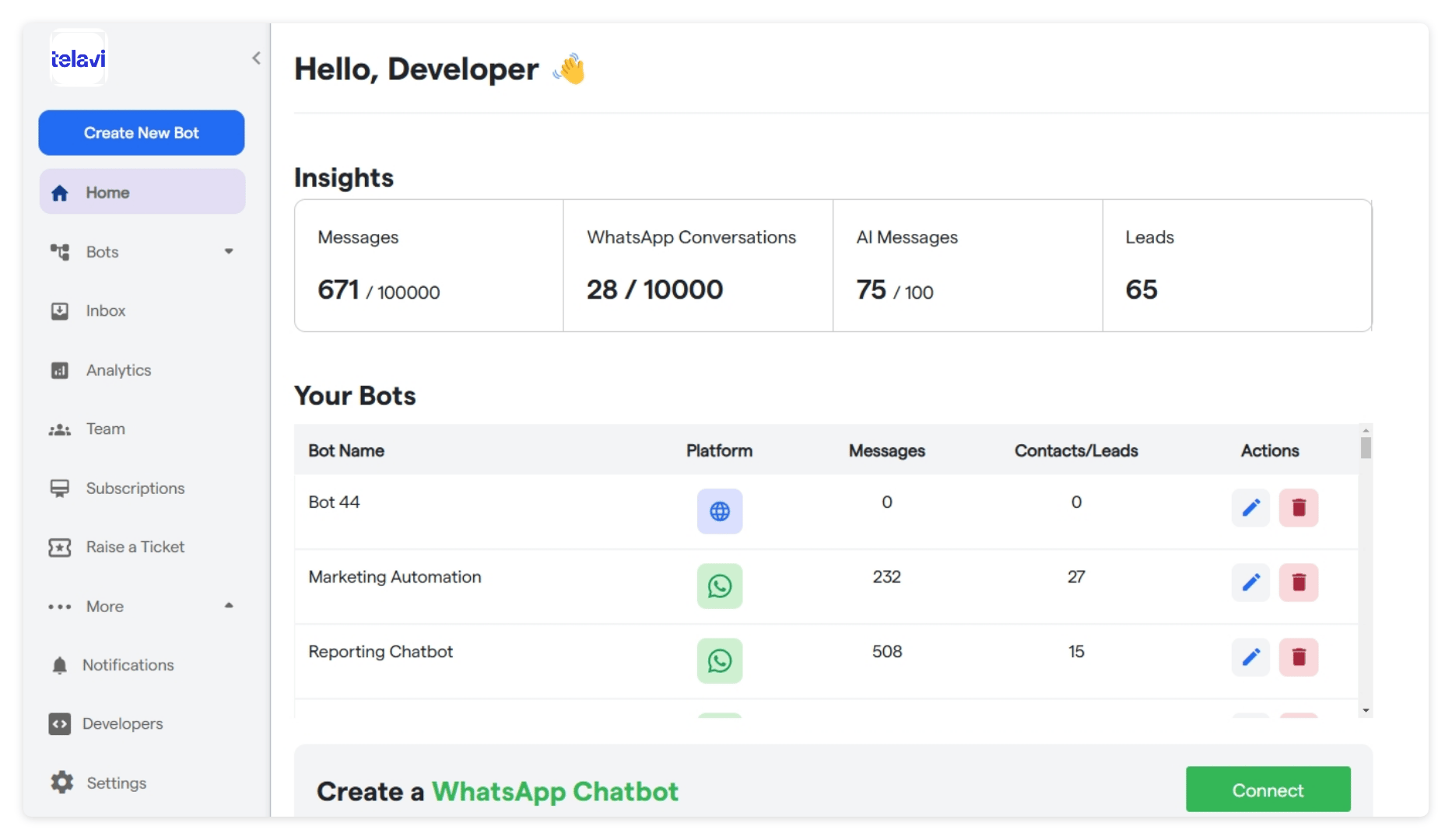
3. Select the primary purpose for creating your bot and proceed further.
<img src="https://mintcdn.com/telavi/coZiJ9Ha2gGa5SDj/images/how-TelaviOneChatAI-works/create-newchatbot/8.instagram_chatbot__TelaviOneChatAI_resource_centre-2.png?fit=max&auto=format&n=coZiJ9Ha2gGa5SDj&q=85&s=2a5d8f878f73fc211f887750fd97efcf" alt="8 Instagram Chatbot  TelaviOneChatAI Resource Centre 2 Pn" width="1866" height="1080" data-path="images/how-TelaviOneChatAI-works/create-newchatbot/8.instagram_chatbot__TelaviOneChatAI_resource_centre-2.png" />

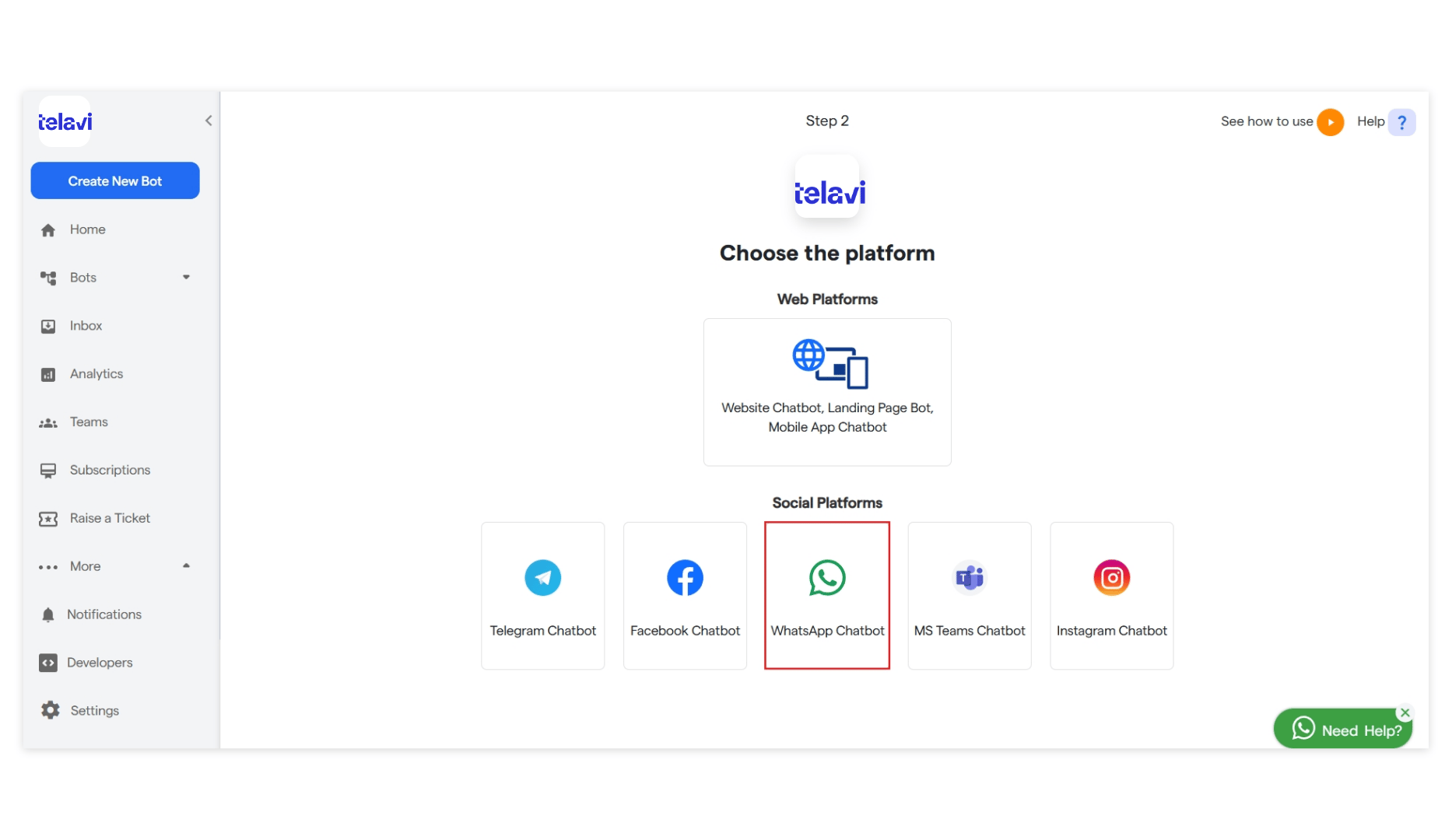
4. Click on "Instagram Chatbot" to begin creating your chatbot.
<img src="https://mintcdn.com/telavi/coZiJ9Ha2gGa5SDj/images/how-TelaviOneChatAI-works/create-newchatbot/8.instagram_chatbot__TelaviOneChatAI_resource_centre-3.png?fit=max&auto=format&n=coZiJ9Ha2gGa5SDj&q=85&s=bbc990b08c409b50eb4cb58a25989b13" alt="8 Instagram Chatbot  TelaviOneChatAI Resource Centre 3 Pn" width="1866" height="1080" data-path="images/how-TelaviOneChatAI-works/create-newchatbot/8.instagram_chatbot__TelaviOneChatAI_resource_centre-3.png" />

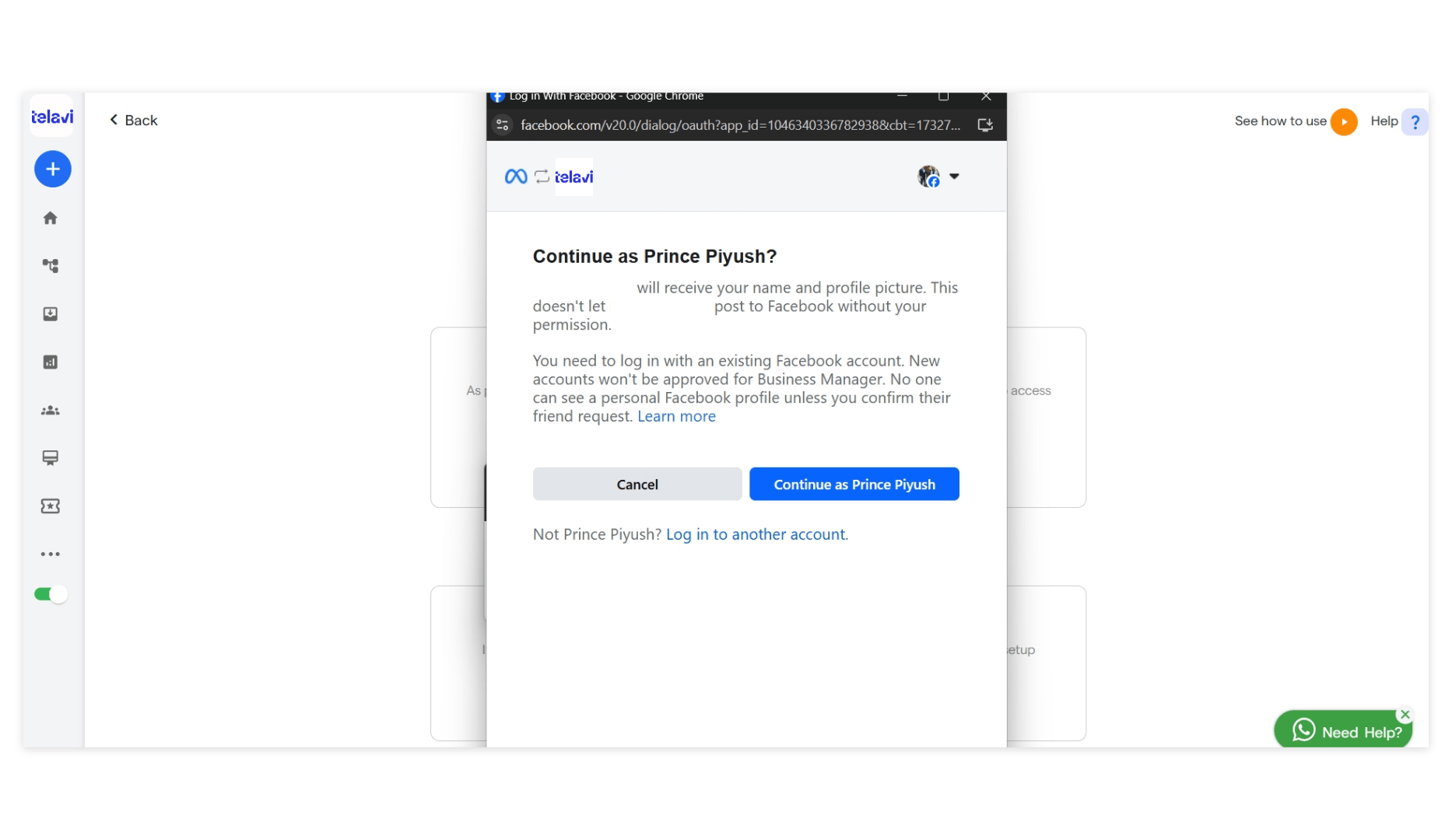
5. Click on “Login” and enter your login credentials.
<img src="https://mintcdn.com/telavi/coZiJ9Ha2gGa5SDj/images/how-TelaviOneChatAI-works/create-newchatbot/8.instagram_chatbot__TelaviOneChatAI_resource_centre-4.png?fit=max&auto=format&n=coZiJ9Ha2gGa5SDj&q=85&s=74171c6d0c6dc059df6ef74a36661593" alt="8 Instagram Chatbot  TelaviOneChatAI Resource Centre 4 Pn" width="1866" height="1080" data-path="images/how-TelaviOneChatAI-works/create-newchatbot/8.instagram_chatbot__TelaviOneChatAI_resource_centre-4.png" />

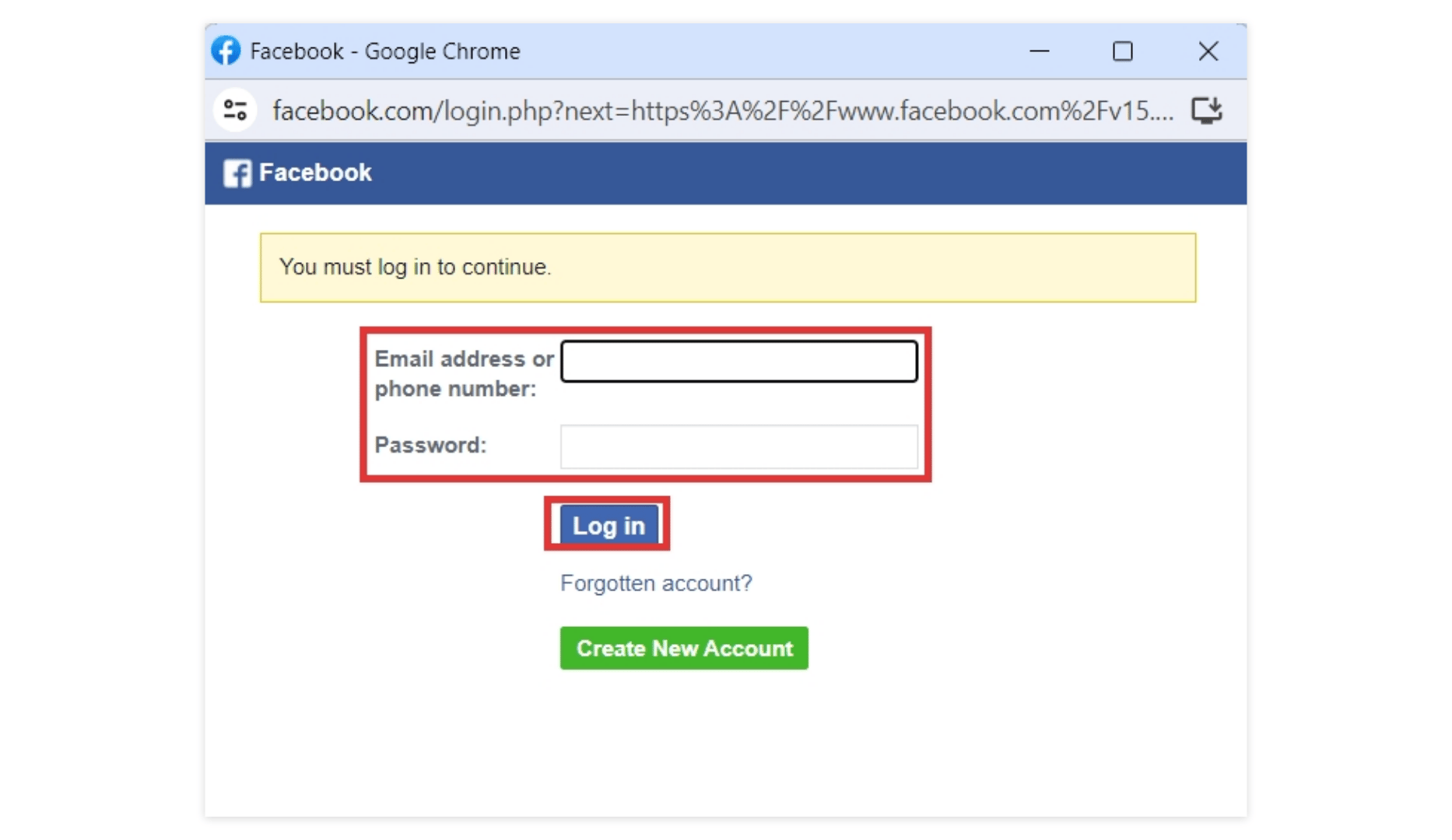
6. Enter your phone number/email address and click **“Log in”.** If you want to create a new Facebook account, click on **“Create New Account”**
<img src="https://mintcdn.com/telavi/coZiJ9Ha2gGa5SDj/images/how-TelaviOneChatAI-works/create-newchatbot/8.instagram_chatbot__TelaviOneChatAI_resource_centre-5.png?fit=max&auto=format&n=coZiJ9Ha2gGa5SDj&q=85&s=10f03fc81609636e525aad14251cb0ce" alt="8 Instagram Chatbot  TelaviOneChatAI Resource Centre 5 Pn" width="1866" height="1080" data-path="images/how-TelaviOneChatAI-works/create-newchatbot/8.instagram_chatbot__TelaviOneChatAI_resource_centre-5.png" />

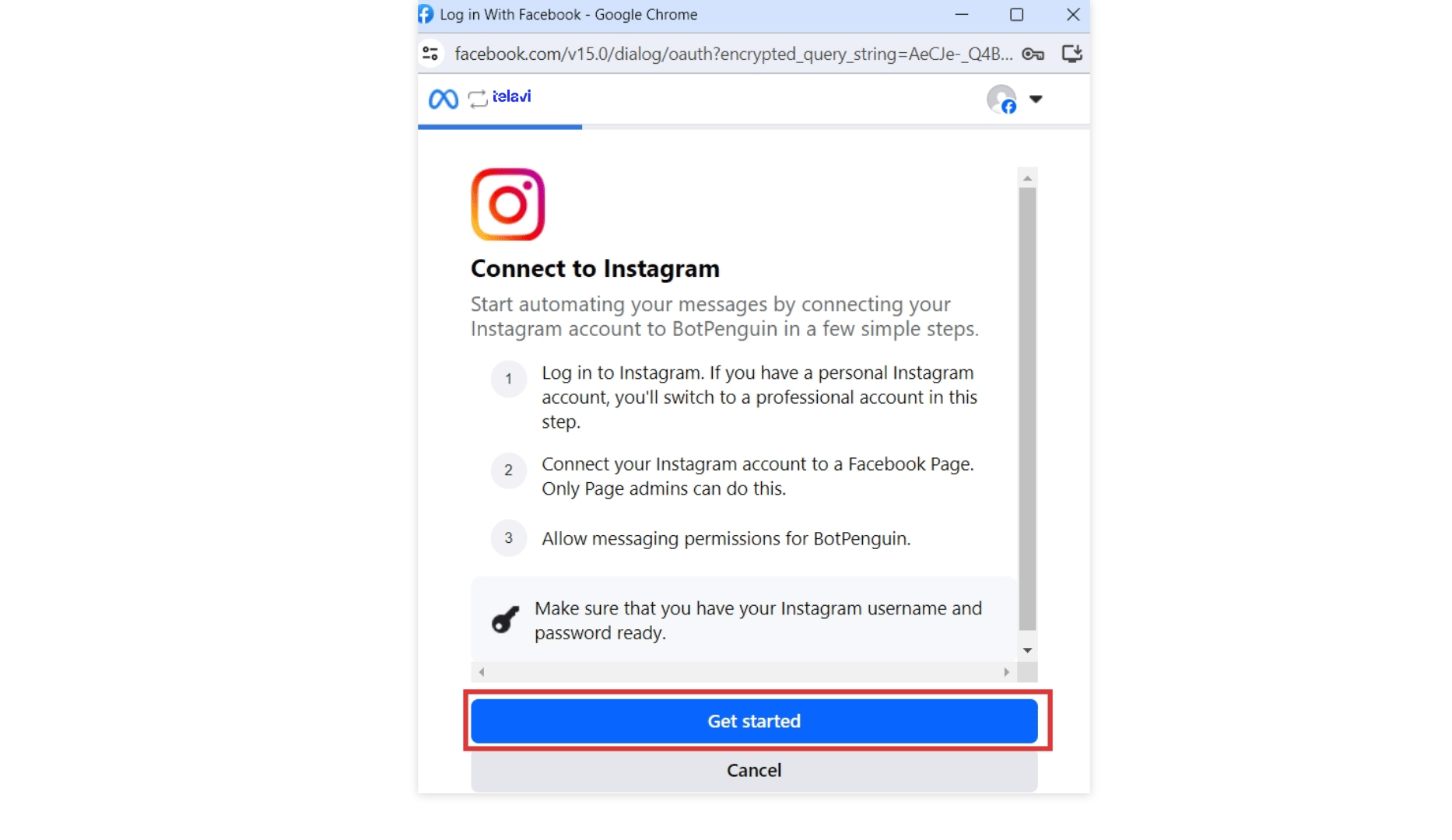
7. Now, click on “Get Started”. Make sure you have an Instagram account.
<img src="https://mintcdn.com/telavi/coZiJ9Ha2gGa5SDj/images/how-TelaviOneChatAI-works/create-newchatbot/8.instagram_chatbot__TelaviOneChatAI_resource_centre-6.png?fit=max&auto=format&n=coZiJ9Ha2gGa5SDj&q=85&s=cf6bbcff75959ded3cf072d3a59fbbc1" alt="8 Instagram Chatbot  TelaviOneChatAI Resource Centre 5 Pn" width="1866" height="1080" data-path="images/how-TelaviOneChatAI-works/create-newchatbot/8.instagram_chatbot__TelaviOneChatAI_resource_centre-6.png" />

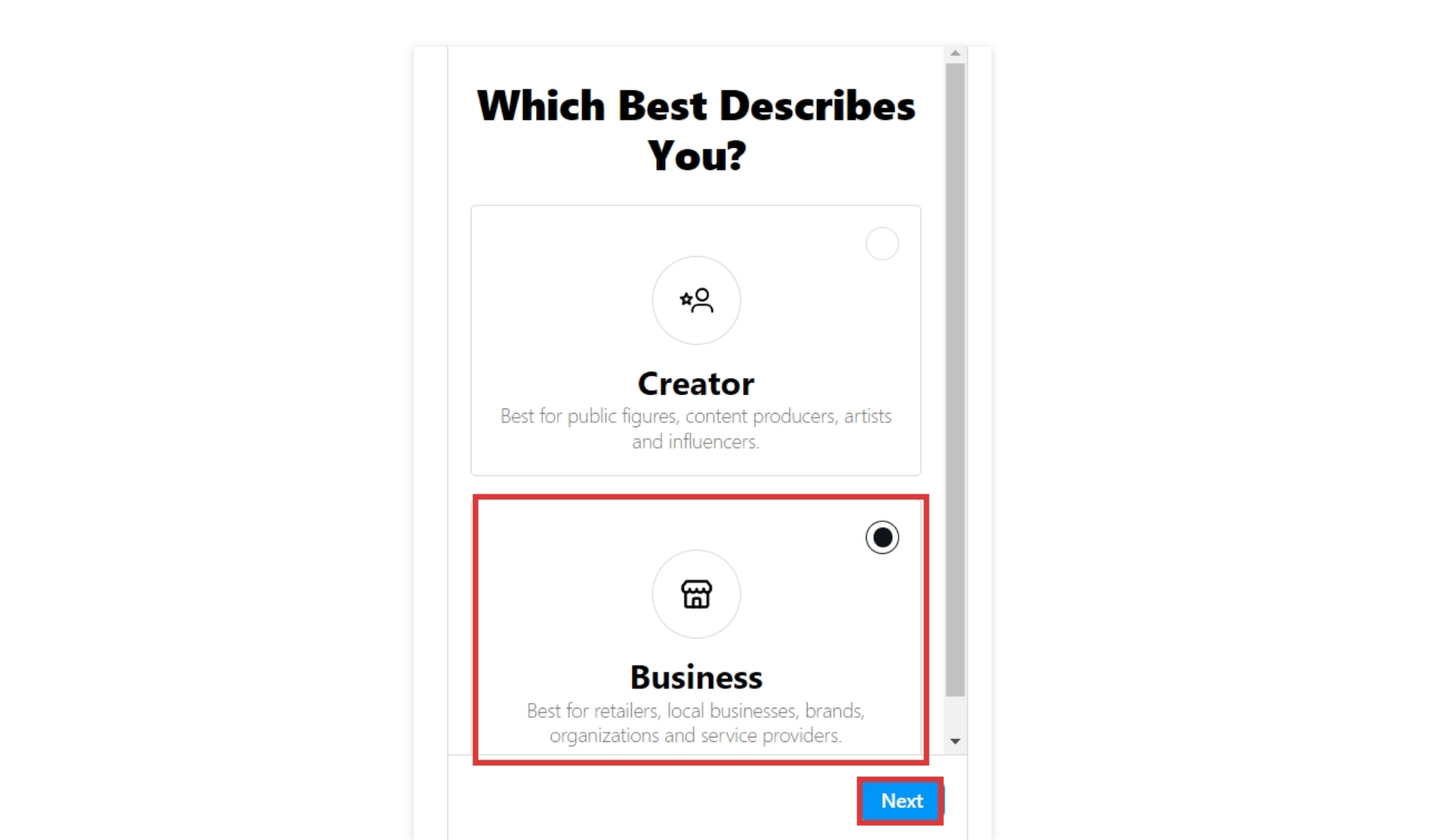
8. After logging in with your Instagram account, you’ll see the below screen.

9. Select the **Business account** to start your Instagram Chatbot and click “Next”.
<img src="https://mintcdn.com/telavi/coZiJ9Ha2gGa5SDj/images/how-TelaviOneChatAI-works/create-newchatbot/8.instagram_chatbot__TelaviOneChatAI_resource_centre-7.png?fit=max&auto=format&n=coZiJ9Ha2gGa5SDj&q=85&s=c443f8f8e3a53bb2de698d6017083950" alt="8 Instagram Chatbot  TelaviOneChatAI Resource Centre 7 Pn" width="1866" height="1080" data-path="images/how-TelaviOneChatAI-works/create-newchatbot/8.instagram_chatbot__TelaviOneChatAI_resource_centre-7.png" />

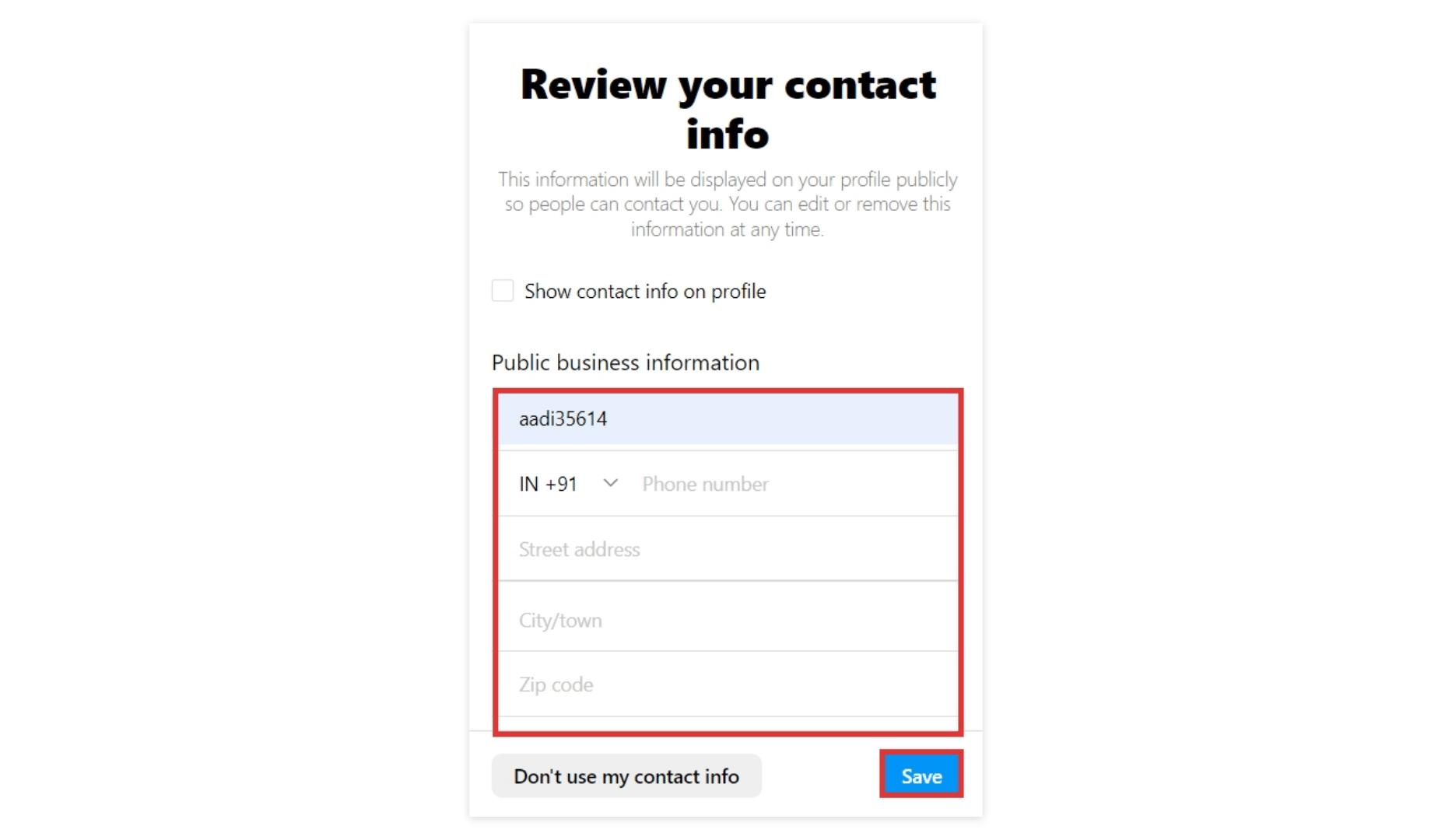
10. Review your business contact information and complete your remaining details.
<img src="https://mintcdn.com/telavi/coZiJ9Ha2gGa5SDj/images/how-TelaviOneChatAI-works/create-newchatbot/8.instagram_chatbot__TelaviOneChatAI_resource_centre-8.png?fit=max&auto=format&n=coZiJ9Ha2gGa5SDj&q=85&s=6e73f7ed7bbb88f9a44942f0fe53107b" alt="8 Instagram Chatbot  TelaviOneChatAI Resource Centre 9 Pn" width="1866" height="1080" data-path="images/how-TelaviOneChatAI-works/create-newchatbot/8.instagram_chatbot__TelaviOneChatAI_resource_centre-8.png" />

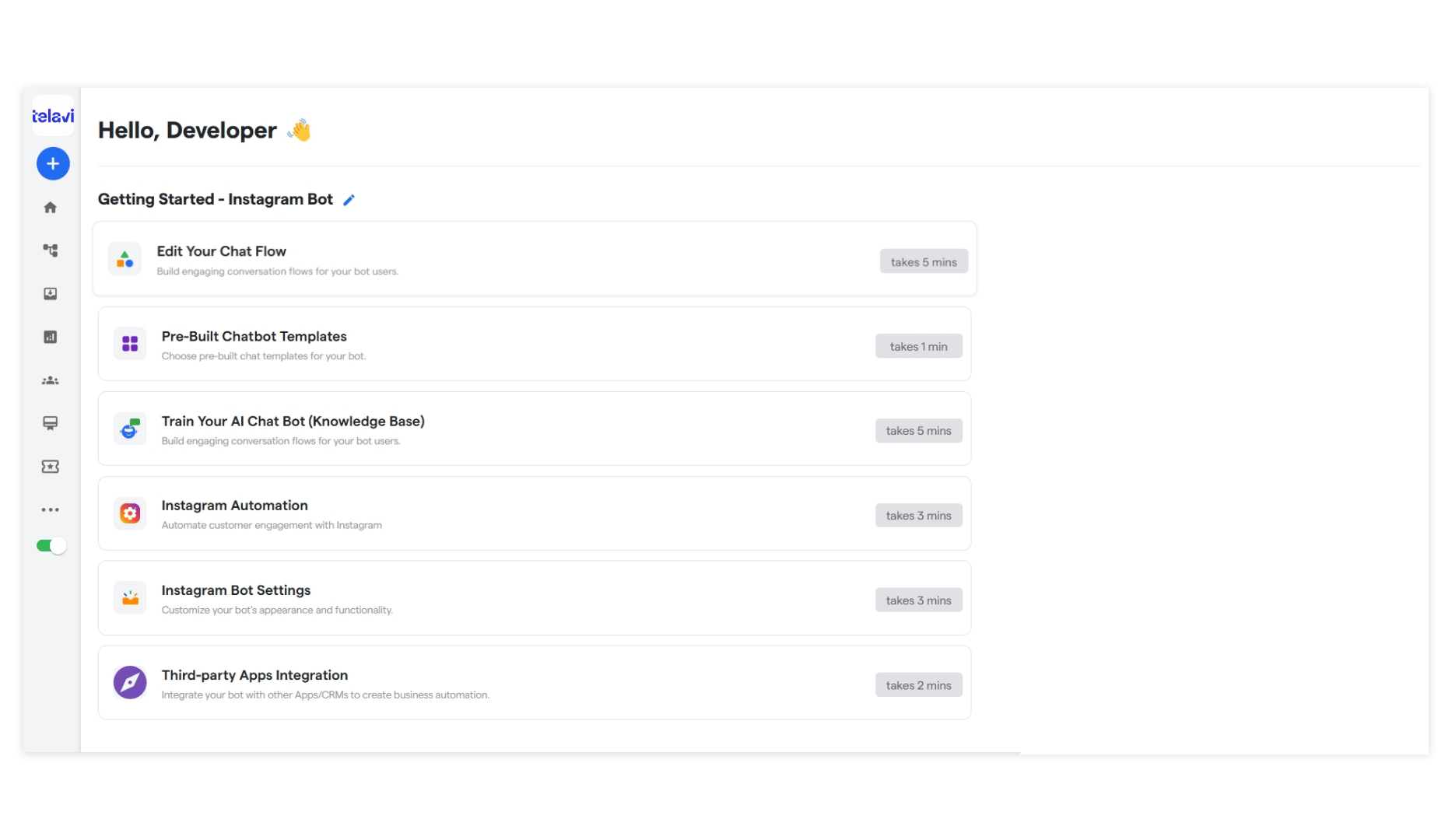
11. Click on “Save” to continue further.
<img src="https://mintcdn.com/telavi/coZiJ9Ha2gGa5SDj/images/how-TelaviOneChatAI-works/create-newchatbot/8.instagram_chatbot__TelaviOneChatAI_resource_centre-9.png?fit=max&auto=format&n=coZiJ9Ha2gGa5SDj&q=85&s=a845ebde84b5086f41415df0bb20a5a5" alt="8 Instagram Chatbot  TelaviOneChatAI Resource Centre 9 Pn" width="1866" height="1080" data-path="images/how-TelaviOneChatAI-works/create-newchatbot/8.instagram_chatbot__TelaviOneChatAI_resource_centre-9.png" />

**You have created your Instagram chatbot!**
